

Introduction
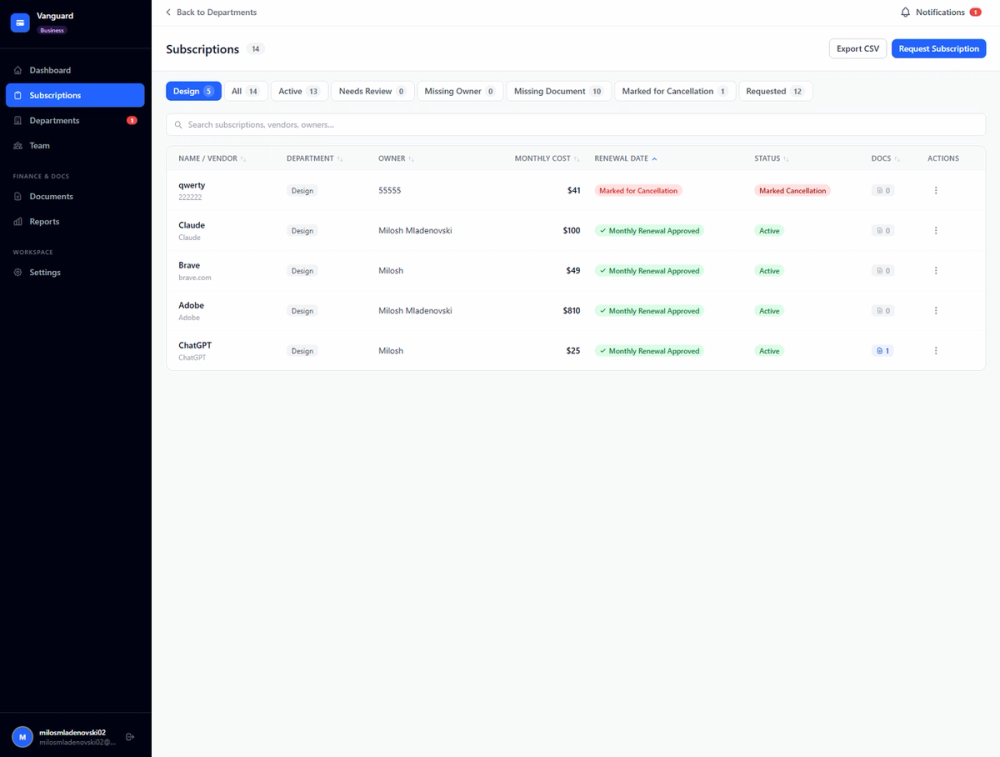
CostLoop is a subscription management app for small businesses, freelancers, entrepreneurs, startups, remote teams, and individuals who want a clearer view of recurring software costs. The public site presents it as a manual tracker for SaaS subscriptions, license renewals, cancellation links, uploaded invoices, contracts, owners, and recurring expenses. Its strongest fit is for users who need more structure than a spreadsheet but do not want to connect bank accounts or manage an enterprise procurement system.
Key Features
- Subscription tracking for recurring tools, including cost, billing cycle, renewal date, status, category, and owner.
- License tracking for seats, assigned users, expiry dates, departments, and related subscription records.
- Renewal reminders with email alerts and visible lead-time options such as 7, 14, or 30 days.
- Cost dashboard for monthly spend, annual forecast, budget usage, category breakdowns, and basic analytics.
- Cancellation links, invoice links, contract storage, receipt links, vendor agreements, and notes attached to subscription records.
- Health score, savings opportunities, unused seat detection, duplicate tool detection, CSV import, CSV export, workspaces, approvals, and admin dashboards on supported plans.
Use Cases
CostLoop is designed for the recurring-cost problems that appear when a business grows its tool stack without a shared tracking process. The CostLoop homepage calls out forgotten auto-renewals, unused seats, scattered invoices, missing cancellation URLs, unclear ownership, and limited visibility into total software spend.
For freelancers, the product appears useful for tracking the subscriptions that sit between personal tools and business expenses: domains, design apps, accounting tools, hosting, project management software, and developer services. The practical value is having cost, renewal, cancellation, and document context in one place before a billing date arrives.
For startups and small teams, CostLoop is more about ownership and review discipline. Owner fields, departments, renewal calendars, admin dashboards, subscription requests, approvals, and team workspaces can help teams decide who is responsible for a tool and whether it still deserves budget.
Pricing
CostLoop publishes a Free plan, Pro plan, and Business plan on its pricing page. Free is listed at $0 per month and lets users test with 1 subscription without a credit card. Pro is listed at $9 per month for 1 user and includes unlimited subscriptions, health score and breakdown, savings opportunities, renewal calendar view, CSV import and export, advanced reminders, bulk actions, and priority support. Business is listed at $39 per month and adds workspace and team members, real-time subscription requests, approvals, instant email notifications to admins, a business panel view, and an admin-level dashboard. The public copy also mentions yearly billing with 2 months free, no annual lock-in, and cancellation from account settings.
User Experience and Support
CostLoop's interface is presented as simple and manual. Users add subscriptions themselves with details such as tool name, cost, renewal date, owner, and notes; the app then organizes spend, renewal reminders, health signals, documents, and exports around those records. This approach is easier to understand than a bank-connected finance platform, but users should expect to maintain the data themselves.
Support information is visible through the contact page, which says email is the best way to reach the team and that replies arrive within 1 business day. The site also mentions billing help, refund requests, plan changes, privacy requests, data export, account deletion, blog guides, email support, and priority support by plan.
Technical Details
CostLoop is a web-based subscription tracker with a no-bank-connection model. The site says it is fully manual, does not connect to bank accounts or credit cards, and does not require read access to financial accounts. It also says users can export subscription data as CSV, and the features page mentions CSV import and CSV export on supported plans.
Other visible operational details include payments via Stripe, authentication and data storage via Supabase, and email via Resend. The site states that CostLoop supports 10 currencies and multiple languages, and it publishes privacy-related controls such as data export, account deletion, privacy settings, and GDPR-related information.
Pros and Cons
Pros
- CostLoop focuses on a specific operational problem: keeping recurring software costs, renewals, owners, and documents visible.
- The manual workflow avoids bank-account and credit-card connections, which may appeal to privacy-conscious users.
- Pricing is clear enough to compare the Free, Pro, and Business tiers before signing up.
- Practical details such as cancellation links, invoice links, contract storage, owner records, and renewal reminders address real subscription-management friction.
- Business features make it more suitable for teams that need approval flows and shared subscription ownership.
Cons
- Manual entry means subscriptions are not automatically discovered from bank or card transactions.
- Some important features, including advanced reminders, CSV import/export, health score, savings opportunities, and team workflows, depend on paid plans.
- CostLoop is not presented as an accounting suite, ERP, procurement platform, or expense-management system.
- Teams that need deep integrations or automatic financial reconciliation should verify current capabilities before relying on it.
FAQ
What is CostLoop?
CostLoop is a subscription and recurring cost tracker for small businesses, freelancers, teams, and individuals. It helps users record software subscriptions, licenses, renewal dates, cancellation links, invoice links, contracts, costs, owners, and notes in one place.
Who is CostLoop best suited for?
CostLoop is best suited for people or teams that already have several recurring tools and need a clearer operating process. It appears especially relevant for freelancers, small businesses, startup teams, remote teams, and individuals who want subscription visibility without connecting financial accounts.
Does CostLoop connect to bank accounts?
No. The public site says CostLoop is fully manual and does not connect to bank accounts or credit cards. Users add their subscriptions themselves, which keeps control with the user but also requires the records to be kept up to date.
What can users track inside CostLoop?
Users can track subscription names, costs, billing cycles, categories, statuses, renewal dates, owners, departments, seat counts, assigned users, notes, cancellation links, invoice links, contract URLs, vendor agreements, and document notes. The site also highlights renewal reminders, dashboard analytics, health score, and savings signals.
How much does CostLoop cost?
CostLoop lists a Free plan at $0 per month for testing with 1 subscription, a Pro plan at $9 per month for 1 user, and a Business plan at $39 per month. The pricing page also mentions yearly billing with 2 months free and cancellation from account settings.
How is CostLoop different from a spreadsheet?
CostLoop adds subscription-specific structure that a spreadsheet usually lacks, such as renewal reminder emails, health score, unused seat detection, duplicate tool detection, cancellation link storage, document links, and owner records. A spreadsheet may still be enough for a tiny list, but CostLoop is built for recurring review.
What should teams verify before choosing CostLoop?
Teams should verify which plan includes the features they need, whether manual tracking fits their internal process, and whether CostLoop's focused scope is enough. If they require automatic spend discovery, accounting sync, procurement approvals beyond the visible Business features, or deep finance integrations, they should confirm current support first.
Conclusion
CostLoop is a focused subscription tracker for users who want recurring software costs organized without linking financial accounts. Its public pages make a practical case around renewal reminders, cost visibility, owners, cancellation links, document storage, and transparent pricing. For small businesses and freelancers replacing scattered spreadsheets, it is worth evaluating as a lightweight recurring-cost control system.