
Introduction
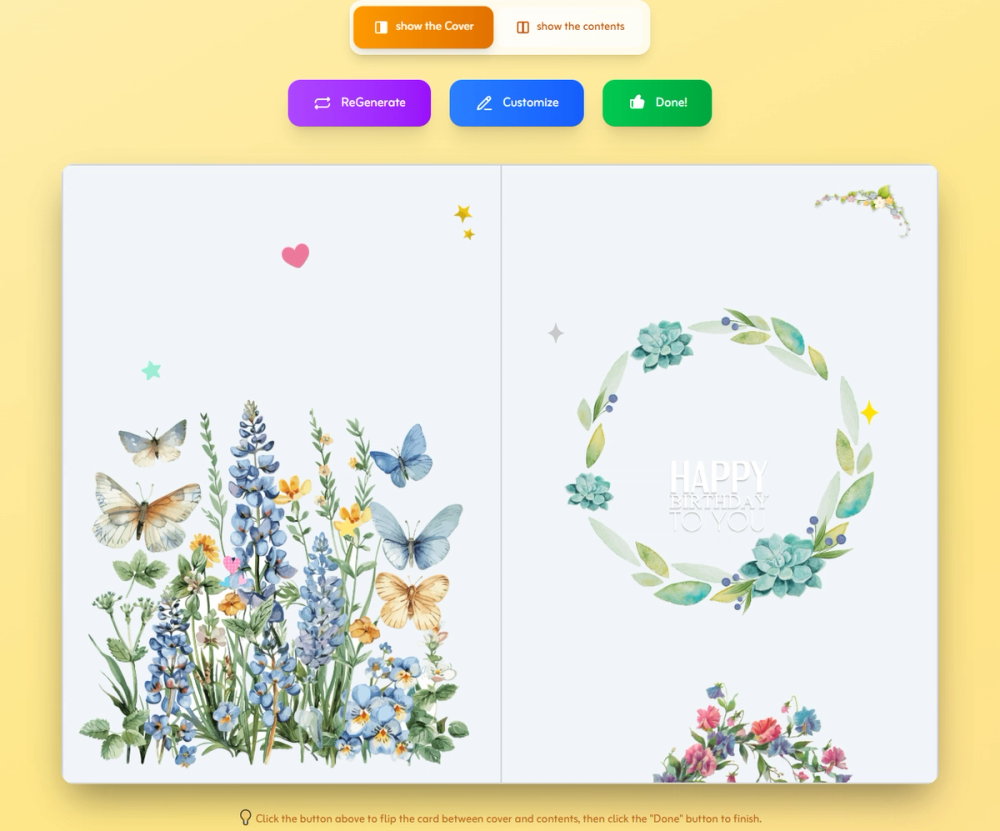
Birthday Card Maker is a free-to-start online card creator for making personalized birthday cards with generated layouts, editable text, uploaded photos, decorations, and shareable or downloadable outputs. The site presents the tool as a fast option for people who need a birthday card without design experience, while still wanting control over the final message and look. Its most practical audience is anyone creating a personal greeting, printable card, or quick digital birthday note.
Key Features
- Smart card generation that can create birthday card designs from an optional recipient name.
- Editing controls for photos, text, colors, fonts, stickers, and design elements.
- Birthday-themed graphics and decorations for different styles, age groups, and occasions.
- Free JPG download for digital use and sharing.
- Paid output options shown for PDF download, print service, and ad-free sharing.
- A related birthday invitation card creator promoted as a newer feature on the site.
Use Cases
Birthday Card Maker fits everyday personal greetings where speed matters but a plain message is not enough. A user can generate a card, add a name or skip the name, customize the wording, then share a JPG or online link with the recipient.
It also works for printable birthday cards when someone wants a more polished format than a screenshot or social post. The site mentions premium PDF output optimized for A4 printing, so it may be useful for people preparing a physical card for a party, classroom, family celebration, or workplace birthday.
The design guidance on the page makes the tool approachable for non-designers. Suggestions around colors, white space, and high-resolution images are especially useful for users who want a card that feels personal but do not know where to start.
Pricing
Birthday Card Maker is described as free to start. The page lists free JPG download and online sharing with ads, while paid options include PDF download, print service, and ad-free sharing. Exact paid prices, print fees, and any usage limits are not visible in the fetched evidence, so users should check the current checkout or export screen before relying on a paid format.
User Experience and Support
The public workflow is simple: enter a name and generate, customize the selected card, then download or share. The option to skip the name is useful for generic greetings, group cards, or situations where the sender wants to keep the design flexible.
The site also points users toward guides and includes practical card-making advice, such as choosing colors for the recipient, avoiding crowded layouts, and using high-resolution images for print clarity. Direct customer support details are not clearly visible from the available page, so users with payment, print, or privacy questions should look for current contact or help information before ordering.
Technical Details
Birthday Card Maker runs as a web-based card generation and editing tool. Visible output and editing signals include JPG download, premium PDF download, online sharing links, photo upload, text editing, color changes, font changes, stickers, and movable design elements.
The fetched page does not clearly explain the AI model, storage practices, file-size limits, browser requirements, or whether uploaded images are retained. Anyone using personal family photos, children's images, or event-specific private details should review the current terms and privacy information before uploading sensitive material.
Pros and Cons
Pros
- Quick three-step workflow keeps the card creation process easy to understand.
- Free JPG export and free sharing make it useful for casual digital greetings.
- Customization options cover common card needs, including photos, text, fonts, colors, and stickers.
- Built-in tips and theme ideas help users create cleaner cards without design training.
Cons
- Exact paid pricing is not visible in the fetched page content.
- Free online sharing includes ads, which may not suit every greeting context.
- Technical and privacy details are limited from the public evidence available.
- Print quality depends partly on the user's uploaded image resolution and the paid output selected.
FAQ
What is Birthday Card Maker?
Birthday Card Maker is an online tool for creating custom birthday cards. Users can generate designs, personalize them with photos and text, and then download or share the finished card.
Who is Birthday Card Maker most relevant for?
It is relevant for people who want a quick birthday greeting without using a full design app. That includes friends, family members, parents, teachers, office organizers, and anyone preparing a simple digital or printable card.
Can I create a card without design experience?
Yes. The site says no design skills are needed and presents a three-step flow: generate, customize, and download or share. Users can also use the page's design tips for colors, spacing, and image quality.
What free options does Birthday Card Maker show?
The visible free options include JPG download and online sharing with ads. The tool is also described as free to start.
Which options are paid?
The page lists PDF download, print service, and ad-free sharing as paid options. Users should verify current prices and conditions before selecting one of those outputs.
Can I upload my own photos?
Yes. The page says users can upload their own photos and add custom text messages to make the card more personal.
Is Birthday Card Maker suitable for printed cards?
It can be, because the site mentions premium PDF output optimized for A4 printing and a print service. Users should confirm PDF quality, paper choices, delivery terms, and final cost before using it for an important printed card.
What should I verify before uploading personal images?
Check the current privacy terms, image storage practices, and any account or sharing settings. The public page explains upload and editing features, but it does not clearly show detailed privacy or retention information in the fetched evidence.
Conclusion
Birthday Card Maker is a practical browser-based option for creating birthday cards quickly, especially when a user wants editable text, personal photos, and a choice between digital sharing and printable output. The free JPG option covers simple greetings, while paid PDF, print, and ad-free sharing options may fit more polished use cases. Before paying or uploading sensitive photos, users should verify current pricing, print terms, and privacy details.