
Introduction
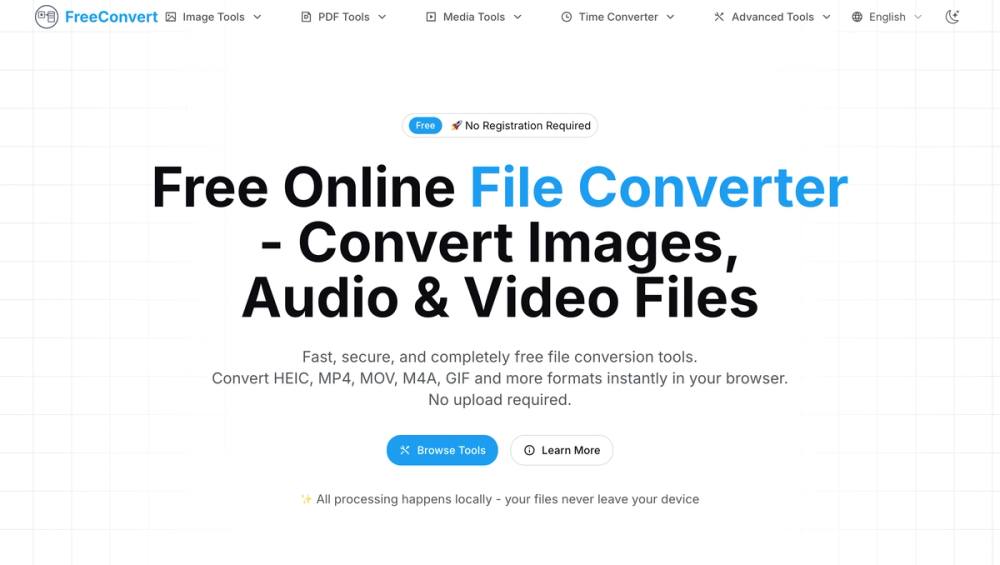
FreeConvert is a browser-based file conversion site for images, audio, video, PDFs, media files, time conversion, and other utility tools. The public page emphasizes free access, no registration, local browser processing, and common conversion workflows such as MP4 to MP3, MOV to MP3, M4A to WAV, HEIC to PDF, HEIC to PNG, and GIF conversion. It appears well suited for users who need quick one-off or batch file conversions without installing desktop software.
Key Features
- Browser-based conversion for image, audio, video, PDF, media, time, and advanced tools.
- No registration required, according to the public homepage.
- Local processing is highlighted with the statement that files never leave the user's device.
- Common tools include MP4 to MP3, MOV to MP3, M4A to WAV, HEIC to PDF, HEIC to PNG, and GIF Converter.
- Batch processing and drag-and-drop support are presented as ways to handle multiple files.
- The site states that its tools are free, with no limits and no watermarks.
Use Cases
FreeConvert is useful for everyday format changes: extracting audio from an MP4, converting a QuickTime MOV file to MP3, turning M4A audio into WAV for editing, or converting Apple HEIC photos into PDF or PNG formats. These are common file-handling tasks that often come up when sharing media, preparing assets, or working across different devices.
The site is also practical for users who care about avoiding uploads. The homepage repeatedly says processing happens locally in the browser and that files never leave the device. That makes the tool especially appealing for personal files, quick media edits, or workflows where users prefer not to send source files to a remote server.
A third fit is lightweight batch work. The page mentions converting multiple files at once with bulk operations and drag-and-drop support. Users with recurring professional conversion needs should still test whether browser performance, file size handling, and output quality match their workload before relying on it for large batches.
Pricing
FreeConvert presents itself as completely free. The public page states that the tools require no registration, have no limits, and add no watermarks. No paid plan, subscription tier, trial, credit system, or enterprise pricing is visible in the fetched evidence. Users who depend on the tool for important work should still confirm current terms on the live site, because free web utilities can change access rules over time.
User Experience and Support
The experience is designed around quick tool selection. The navigation includes Image Tools, PDF Tools, Media Tools, Time Converter, Advanced Tools, and language selection, while the homepage highlights the most common converters directly. The wording is clear and task-oriented, which helps users find a converter by input and output format rather than by a broad product category.
Support evidence is limited in the fetched page. The site gives tool descriptions and a clear homepage flow, but it does not show a help center, support email, live chat, or documentation hub in the provided evidence. For casual conversions this may not matter, but users with business-critical workflows should verify whether support or troubleshooting guidance is available.
Technical Details
The technical detail that matters most is local browser processing. FreeConvert states that all conversions happen in the browser and that files are not uploaded. This suggests the conversion experience depends partly on the user's browser, device resources, file size, and the specific conversion being performed.
The site highlights modern web technology, instant conversion, bulk operations, drag-and-drop support, and no download or installation requirement. No API, desktop app, cloud storage integration, automation feature, or developer documentation is visible in the fetched evidence, so teams looking for programmatic conversion should verify whether such options exist before adopting it.
Pros and Cons
Pros
- Clear focus on common file conversions across images, audio, video, PDFs, and media tools.
- Browser-based workflow avoids software installation.
- Public copy emphasizes local processing, which is useful for users cautious about file uploads.
- Free access, no registration, no limits, and no watermarks are stated on the homepage.
- Batch processing and drag-and-drop support can help with multiple files.
Cons
- Support routes are not clearly visible in the fetched evidence.
- No API, automation, or integration details are shown for teams that need repeatable workflows.
- Browser-based conversion may depend on local device performance and browser compatibility.
- The fetched evidence comes from the primary page only, so deeper tool-specific limits may need verification.
- Users should confirm whether the no-limit and no-watermark claims still apply to the specific converter they plan to use.
FAQ
What is FreeConvert used for?
FreeConvert is used to convert files online in the browser. The public page highlights image, audio, video, PDF, media, time, and advanced tools, with examples such as MP4 to MP3, MOV to MP3, M4A to WAV, HEIC to PDF, HEIC to PNG, and GIF conversion.
Does FreeConvert require registration?
The homepage states that no registration is required. Users can choose from the available tools and start conversions without creating an account, according to the visible page copy.
Are files uploaded to FreeConvert's servers?
The public page says all processing happens locally and that files never leave the user's device. That is an important privacy-related claim, but users handling sensitive files should still review the live site's current terms and behavior before relying on it.
Is FreeConvert free?
Yes, the fetched evidence describes FreeConvert as completely free, with no registration, no limits, and no watermarks. No paid plan or subscription is visible in the provided page evidence.
Which conversions are highlighted on the site?
The homepage highlights MP4 to MP3, MOV to MP3, M4A to WAV, HEIC to PDF, HEIC to PNG, and GIF Converter. It also links broader categories such as Image Tools, PDF Tools, Media Tools, Time Converter, and Advanced Tools.
Can FreeConvert handle multiple files?
The page mentions batch processing, bulk operations, and drag-and-drop support. Users planning large batches should confirm performance and any tool-specific restrictions in their own browser.
Does FreeConvert offer an API or integrations?
No API, integrations, or automation documentation is visible in the fetched evidence. Teams that need programmatic file conversion should verify whether FreeConvert offers developer features or consider a tool built for API workflows.
What should users check before using FreeConvert for important files?
Users should check browser compatibility, file size behavior, output quality, privacy terms, support options, and whether the specific converter they need has any hidden limits. This is especially important for professional media, client files, or recurring conversion tasks.
Conclusion
FreeConvert is a practical web utility for common file conversions, especially when users want a no-install browser workflow. Its strongest public signals are free access, local processing, no registration, no watermarks, batch handling, and a broad set of media conversion tools. The main caveat is that deeper support, API, and tool-specific limits are not visible in the fetched evidence, so frequent users should verify those details before relying on it heavily.