
Introduction
SQL Planner is a SQL Server and Windows infrastructure monitoring product for database administrators, system administrators, hosting providers, developers, and organizations running multiple SQL Server instances. The public site presents it as a browser-accessible management and monitoring solution with SQL health analysis, server monitoring, alerts, backup automation, index defragmentation, scripting, and ServiceNow event synchronization.
The product is most relevant for teams that need operational visibility across SQL Server and Windows environments without relying only on manual checks. Its strongest public value is the breadth of monitoring and automation features, while buyers should verify deployment requirements, permissions, support terms, and compatibility with their own infrastructure.
Key Features
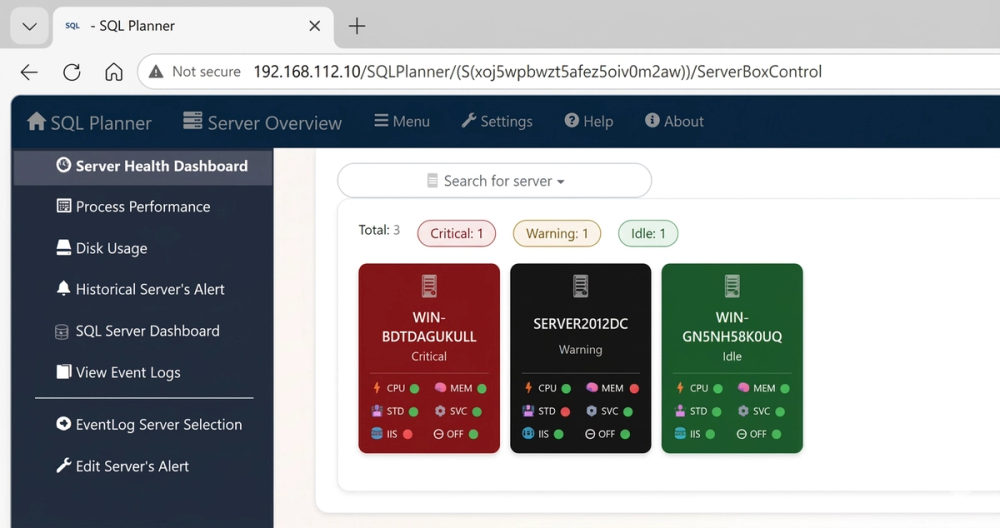
- Real-time tracking of performance metrics, deadlocks, query execution, server logs, CPU, memory, IIS, network I/O, storage, services, and event logs.
- SQL health analysis, diagnostics, and reporting for uptime, performance, and system stability.
- Automated SQL backup, scripting automation, statistics maintenance, and index defragmentation.
- Security auditing, user tracking, and compliance-oriented reporting features.
- Browser-based dashboard access from desktop, tablet, PC, or mobile devices.
- ServiceNow integration for syncing SQL Server and Windows Server events into ticket creation and lifecycle tracking.
Use Cases
SQL Planner is built for teams responsible for keeping SQL Server and Windows environments observable, documented, and recoverable. A SQL Server DBA could use it to monitor query behavior, deadlocks, backups, index fragmentation, and health checks, while a system administrator could use the Windows monitoring features for CPU, memory, event logs, storage, and services.
The product also appears useful for organizations with many servers or SQL instances. The site states that it can monitor unlimited Windows Servers and hundreds of SQL instances for free, and it names individual service providers, SQL Server hosting sites, system admins, network admins, SQL Server DBAs, SQL Server developers, and organizations using several servers as likely users.
Another notable use case is automation in SQL Server Express environments. The public page says SQL Planner supports all SQL editions, including Express, and that task automation is independent of SQL Agent. That matters for smaller deployments where SQL Agent may not be available but scheduled maintenance and backup workflows are still needed.
Pricing
SQL Planner presents its Professional Edition as absolutely free and describes SQL Planner Enterprise Edition as "Now Free Forever" in the installation and activation materials. The site also references Support and AMC as a paid service area, with service and pricing links for installation, technical support, or annual maintenance coverage. Readers should confirm the current edition terms, support costs, AMC scope, and any commercial-use conditions before standardizing on the tool.
User Experience and Support
SQL Planner emphasizes browser-based flexibility. The site says users can access the control dashboard through a web browser and from different device types, which is useful for teams that need monitoring access outside a single desktop machine. The product also includes automated documentation and DBA handover notes, which can help teams communicate during shift changes or incident response.
Support signals are stronger than many small infrastructure tools. The public evidence includes support@mssqlplanner.com, SQL Planner training, installation documentation, FAQ and configuration topics, activation steps, email alert setup, ServiceNow integration guidance, analytics and diagnosis documentation, and a Support, Services & AMC section. Technical buyers should still review the documentation before deployment because monitoring tools often require careful permissions and server access.
Technical Details
SQL Planner is designed for SQL Server and Windows Server monitoring, including on-premise SQL Server, SQL Server on cloud VMs, and Linux-related SQL Server monitoring references. The site also mentions DB Health Pro as a Windows desktop-based tool for health reports, performance analytics, inventory summaries, and multiple database technologies such as SQL Server, MySQL, Oracle, and Postgres.
Technically important details include a browser-based interface, email alert configuration, ServiceNow event synchronization, backup automation, SQL scripting, index analysis, defragmentation, event log monitoring, and support for SQL Server Express without depending on SQL Agent for task automation. The site also describes a dual-layered security framework and Softpedia certification, but buyers should evaluate security architecture and installation permissions directly before production rollout.
Pros and Cons
Pros
- Broad SQL Server and Windows Server monitoring coverage in one product family.
- Free edition positioning makes it approachable for smaller teams and SQL Server Express users.
- Browser-based dashboard access is convenient for distributed operations teams.
- ServiceNow synchronization can help connect infrastructure events with ticket workflows.
- Documentation, training, support email, and AMC options are visibly available.
Cons
- Infrastructure monitoring setup may require careful permissions, configuration, and internal review.
- The site presents many related products and services, so buyers should confirm exactly which features belong to each edition.
- Support and AMC pricing is referenced but not fully detailed in the captured evidence.
- Security claims should be reviewed through documentation and internal testing before production use.
- Teams using non-Microsoft monitoring stacks should verify fit before adding another monitoring layer.
FAQ
What is SQL Planner?
SQL Planner is a SQL Server and Windows infrastructure monitoring solution. It includes monitoring, health analysis, alerts, backup automation, scripting, index defragmentation, auditing, and dashboard access for teams managing database and server environments.
Who is SQL Planner suited for?
SQL Planner is suited for SQL Server DBAs, system administrators, network administrators, SQL Server developers, hosting providers, service providers, and organizations that manage several servers or SQL Server instances.
Does SQL Planner support SQL Server Express?
Yes. The public site says SQL Planner supports all SQL editions, including Express, and that its task automation feature is independent of SQL Agent. That makes it relevant for SQL Server Express users who still need maintenance automation.
What can SQL Planner monitor?
The public evidence mentions SQL performance metrics, deadlocks, query execution, CPU, memory, IIS, network I/O, storage, services, event logs, backup jobs, index fragmentation, and server health. It also references Windows Server and SQL Server monitoring from one dashboard.
Is SQL Planner free?
The site says the Professional Edition is absolutely free and references SQL Planner Enterprise Edition as "Now Free Forever." Support and AMC appear to be separate service areas, so users should confirm current licensing and support terms before deployment.
Does SQL Planner integrate with ServiceNow?
Yes. The site states that SQL Server and Windows Server events can sync with ServiceNow to automate ticket creation and lifecycle tracking directly from the dashboard. Teams should verify configuration requirements during setup.
What support resources are visible for SQL Planner?
Visible support resources include a support email address, installation instructions, prerequisite documentation, activation steps, FAQ, configuration guides, email alert setup, ServiceNow integration guidance, SQL Planner training, and Support, Services & AMC information.
What should teams verify before installing SQL Planner?
Teams should verify server permissions, network access, supported SQL Server versions, ServiceNow configuration, email alert setup, backup requirements, security controls, and whether they need paid support or AMC for production use.
Conclusion
SQL Planner is a practical option for teams that want SQL Server and Windows monitoring, automation, backup oversight, and operational documentation in a browser-accessible product. Its feature set is especially relevant for DBAs and administrators managing several SQL instances or Windows servers.
The public site gives substantial product detail, including free edition language and support resources. Before relying on it in production, teams should test installation requirements, alerting behavior, security controls, and support options against their own infrastructure standards.