
Introduction
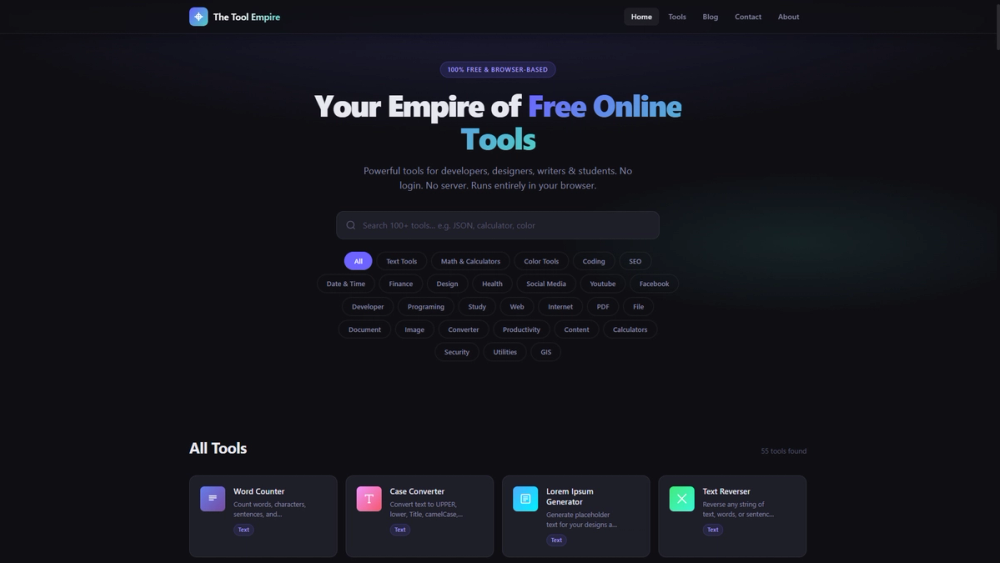
The Tool Empire is a collection of free, browser-based online tools for developers, designers, writers, and students. Every tool runs entirely in the browser with no server processing, no account requirement, and no data collection - your inputs never leave your device. The site covers text manipulation, math calculations, color utilities, coding helpers, SEO tools, and more, with new tools added weekly based on user suggestions. For anyone who regularly reaches for quick utility tools and prefers privacy over feature-gated SaaS products, The Tool Empire takes a deliberately minimalist approach.
Key Features
- 100% Browser-Based Processing - Every tool executes locally in the browser. JSON formatting, text transformation, math calculations, color conversions - none of it touches a server. This means the tools work offline once loaded and leave no data footprint.
- Zero Account Requirements - No login, no email confirmation, no cookie consent beyond the bare minimum. Open a tool, use it, close it. The site describes this as a design constraint: every tool must work without creating friction.
- Instant Results - No submit buttons or loading spinners. Output updates the moment you change a value, because everything runs client-side. This makes the tools feel responsive even on slower connections.
- Responsive Across Devices - Every tool adapts to phone screens, tablets, and wide monitors. Touch-friendly and keyboard-accessible, with no separate mobile app required.
- Weekly New Tools - The site ships new tools based on user suggestions, with a contact form for requests. This suggests an active development cadence driven by community feedback.
Use Cases
For developers who need quick JSON formatters, code formatters, or text utilities during a coding session, the browser-based approach means no context-switching to a separate tool site that requires signup. The privacy angle is particularly relevant for developers handling sensitive code snippets or configuration data.
For writers and students working with text transformation, word counters, or case converters, the instant-result interface keeps the workflow fluid. You paste text, see the output immediately, and move on - no account walls or export limitations.
For designers who need color pickers, contrast checkers, or palette generators, the responsive design means these tools work on a phone during a client meeting or on a wide monitor during a design session. The fact that color data stays local is a minor but real benefit for designers handling client brand guidelines.
Pricing
Every tool is completely free with no freemium tiers, no pro plans, and no credit card prompts. The site explicitly states there is no catch - every tool is fully unlocked for everyone, forever. There are no paid plans visible on the public pages.
User Experience and Support
The site is minimal by design: a clean grid of tools, no onboarding flow, no dashboard, no account settings. Each tool opens directly to its interface. Support is available via email (contact@thetoolempire.com) with a stated response time within 48 hours. The contact form handles bug reports, tool suggestions, feedback, and partnership inquiries.
Technical Details
All processing happens client-side in the browser. No server-side computation, no API calls for tool execution, no data storage. The site uses standard web technologies and requires no plugins or special browser features. New tools are added weekly, suggesting an active static-site or lightweight dynamic architecture. The site is accessible on any modern browser across desktop and mobile.
Pros and Cons
Pros
- Complete privacy by design - no data ever leaves your device
- Zero friction: no accounts, no paywalls, no ads visible on the public pages
- Instant client-side results feel fast regardless of connection speed
- Responsive design works across all devices without separate mobile apps
- Free forever with no hidden monetization model visible on the public pages
Cons
- The tool library's breadth is not fully visible from the homepage - specific tool counts and categories require browsing
- No offline capability beyond what the browser caches - tools require an initial page load
- Limited to browser-based processing, which may restrict complex operations that need server-side computation
- Support is email-only with a 48-hour stated response time
- No API or programmatic access for developers who want to integrate tools into workflows
FAQ
What is The Tool Empire?
The Tool Empire is a collection of free, browser-based online tools for text, math, color, coding, SEO, and more. Every tool runs entirely in your browser with no server processing, no account requirement, and no data collection.
Is it really free? What's the catch?
Every tool is fully unlocked for everyone, forever. There is no freemium tier, no pro plan, and no credit card form. The site states there is no catch.
Does my data leave my device?
No. All processing happens locally in the browser. Your JSON, text, images, and financial figures are never sent to a server, stored, or transmitted anywhere.
How often are new tools added?
New tools are added weekly based on user suggestions. You can suggest tools through the contact form on the site.
What platforms and devices are supported?
Every tool works on any modern browser across phones, tablets, and desktop monitors. The site is touch-friendly and keyboard-accessible with no separate mobile app required.
How do I get support or report a bug?
Contact the team via email at contact@thetoolempire.com or through the site's contact form. The stated response time is within 48 hours.
Conclusion
The Tool Empire serves a clear purpose: providing quick, private, browser-based utilities without the friction of accounts, subscriptions, or data collection. For developers, writers, and students who regularly need text formatters, code tools, or color utilities, the zero-barrier approach is genuinely useful. The privacy-first design is the real differentiator - in a landscape where most free tool sites harvest data or gate features behind email signups, The Tool Empire's commitment to client-side processing and zero tracking is worth noting. The main limitation is that the tool library's full scope requires browsing the site directly, since the homepage provides a summary rather than a complete catalog.